Kepler
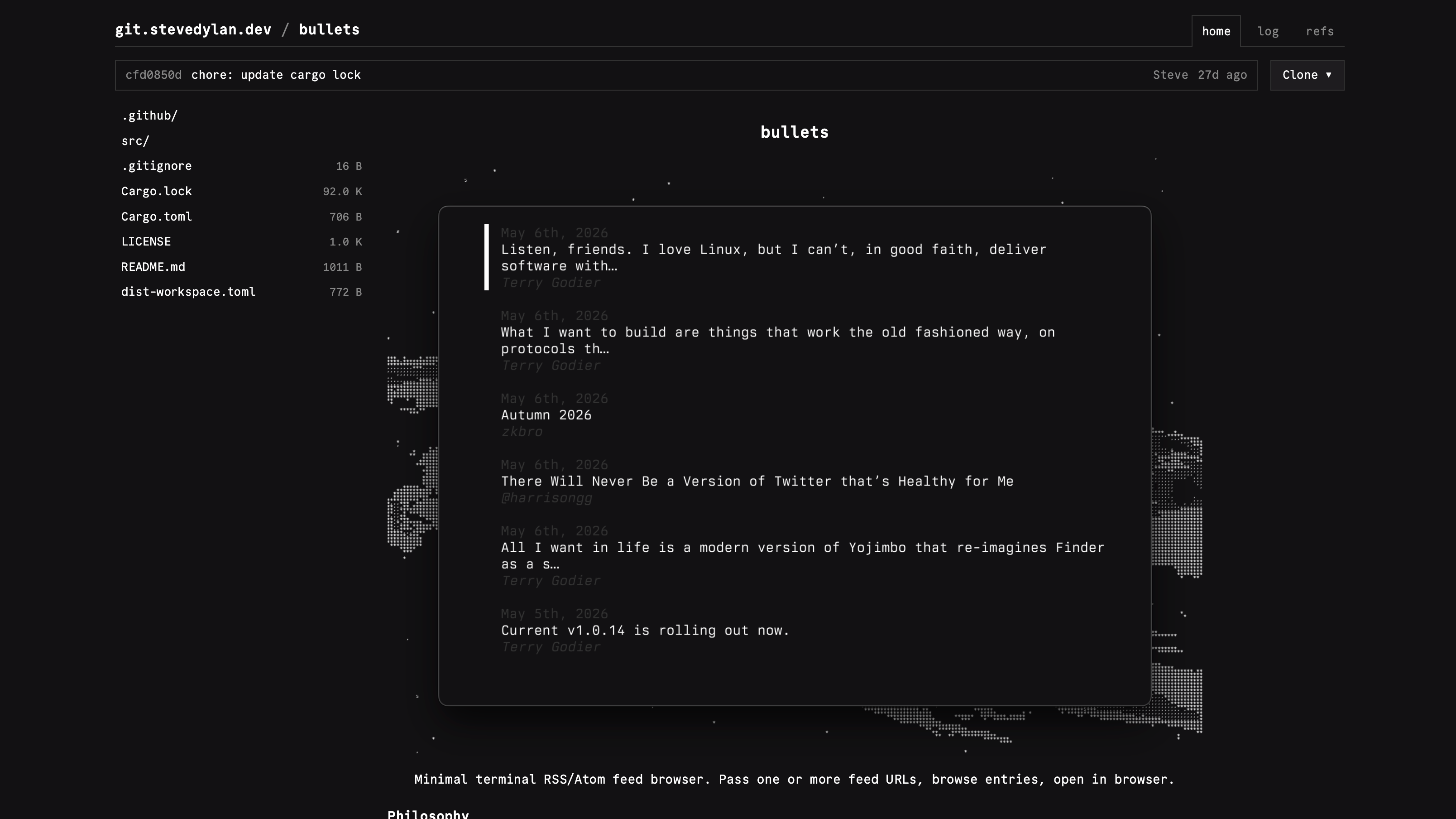
Kepler is a read-only web view for on-disk git repositories. It's drop-in compatible with softserve's <data>/repos layout. Point KEPLER_REPO_ROOT at your directory and browse your repos in the browser, no database or auth required.
- Single Go binary with embedded assets
- Repo index with description + last-commit time
- README rendering (goldmark)
- Tree / blob browsing at any ref (branch, tag, SHA)
- Raw file download
- Commit log with pagination and single-commit diff view
- Branches + tags page
- Archive download:
.tar.gz,.zip - Atom feed per repo
- Public read-only JSON API
- Dark themed UI with Commit Mono font
Configure
Environment Variables
| Variable | Description | Default |
|---|---|---|
HOST | Bind address (use 0.0.0.0 in Docker) | 127.0.0.1 |
PORT | Listen port | 4747 |
KEPLER_REPO_ROOT | Directory of bare repos (*.git/) or normal repos | ./repos |
KEPLER_SITE_NAME | Site name shown in the header and feed | kepler |
KEPLER_BASE_URL | Public base URL for Open Graph / social meta tags | http://localhost:4747 |
KEPLER_CLONE_BASE_URL | HTTPS entry in the repo-home Clone menu (URL = <base>/<repo>.git). Point at the host that actually serves git (e.g. softserve), not kepler | (empty) |
KEPLER_CLONE_SSH_HOST | SSH (scp-style) entry in the Clone menu (URL = <user@host>:<repo>.git, e.g. git@git.example.com). Include the user | (empty) |
The repo-home Clone dropdown shows whichever of KEPLER_CLONE_BASE_URL and KEPLER_CLONE_SSH_HOST are set; if both are empty the button is hidden. Kepler only serves a web view — point the clone URLs at the host that actually serves git over HTTPS/SSH.
Deploy
Docker
cd apps/kepler
cp .env.example .env
# Edit .env, set KEPLER_REPO_ROOT to your repos directory
docker compose up -dThe compose file mounts KEPLER_REPO_ROOT into the container read-only at /data/repos, so Kepler can never modify your repositories.
Binary
Build from source:
cd apps/kepler && go build .The resulting binary is self-contained with all assets embedded. Copy it to your server with a configured .env file and run it directly.
Use
Point KEPLER_REPO_ROOT at a directory of git repos and start the server:
KEPLER_REPO_ROOT=~/.local/share/soft-serve/repos go run .Then open http://127.0.0.1:4747
Repo discovery
Each entry of KEPLER_REPO_ROOT is treated as a candidate:
<name>.git/→ bare repo; display name = stripped basename.<name>/.git/→ non-bare repo; display name = dirname.
A description file in the repo directory shows on the index and repo home (softserve writes this; the default placeholder is filtered out).
Routes
| Path | Purpose |
|---|---|
/ | Repo index |
/{repo} | Repo home (README + latest commit) |
/{repo}/refs | Branches and tags |
/{repo}/log/{ref} | Commit log (paginated) |
/{repo}/commit/{sha} | Single-commit diff |
/{repo}/tree/{ref}/{path...} | Directory tree at a ref |
/{repo}/blob/{ref}/{path...} | Syntax-highlighted file view |
/{repo}/raw/{ref}/{path...} | Raw file download |
/{repo}/archive/{name} | Archive download (.tar.gz, .zip) |
/{repo}/atom.xml | Per-repo Atom feed |
/api/repos | Public JSON list of all repos |
API
GET /api/repos returns a JSON list of every repo. No auth, CORS open (Access-Control-Allow-Origin: *).
{
"site": "kepler",
"repos": [
{
"name": "andromeda",
"description": "monorepo",
"default_ref": "main",
"last_commit": "2026-06-14T10:00:00Z",
"url": "https://git.example.com/andromeda",
"atom_url": "https://git.example.com/andromeda/atom.xml",
"clone_https": "https://git.example.com/andromeda.git",
"clone_ssh": "git@git.example.com:andromeda.git"
}
]
}url and atom_url are derived from the request host (honors X-Forwarded-Proto behind a proxy). The clone_https / clone_ssh fields appear only when KEPLER_CLONE_BASE_URL / KEPLER_CLONE_SSH_HOST are set.