Sipp
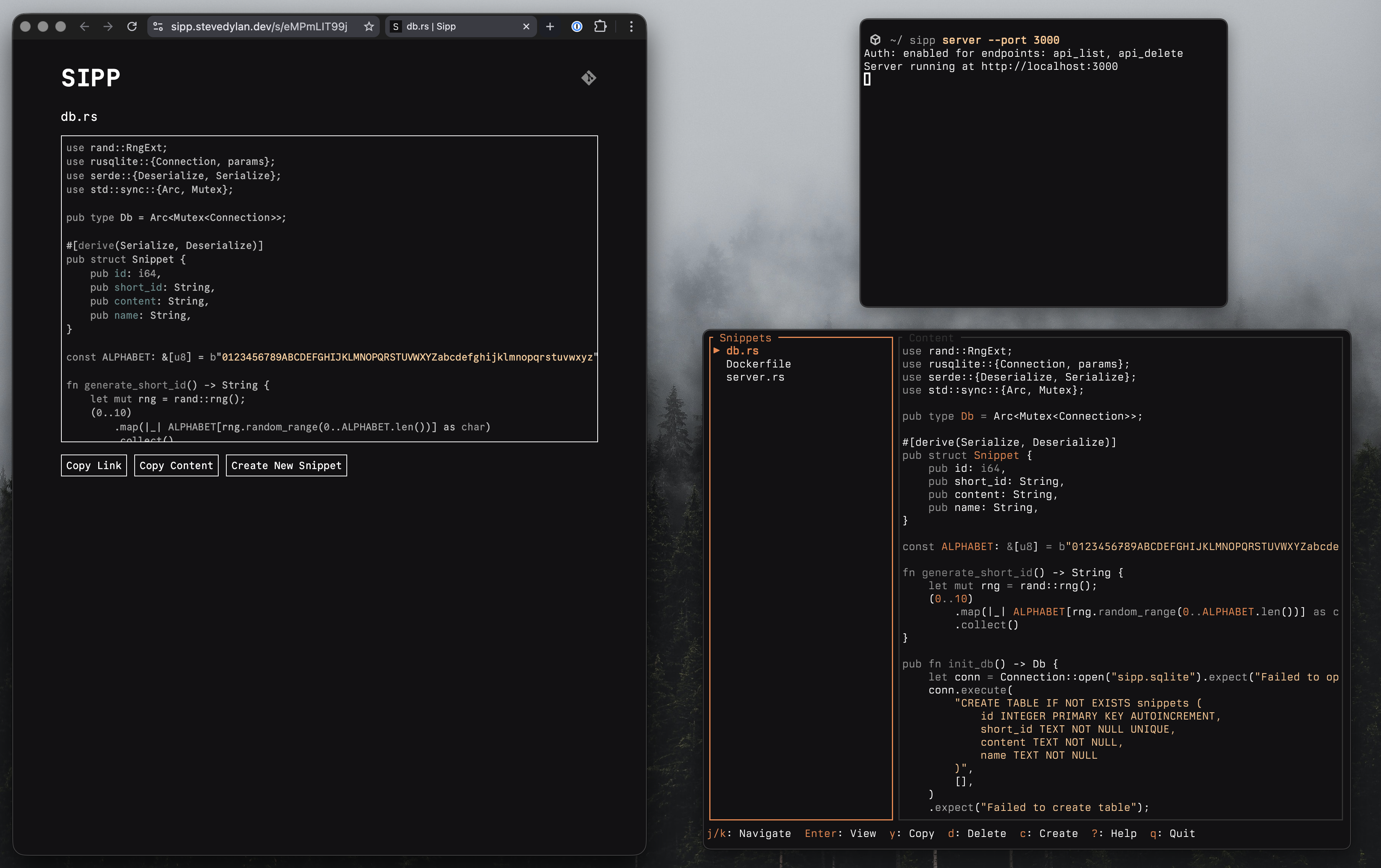
A single binary for code sharing with a web server and interactive TUI.
- Create snippets and share on the web
- Raw output for CLI tools --
curl,wget, andhttpieget plain text automatically - Interactive TUI with authenticated access for snippet management
- Minimal, fast, and low memory consumption
Install
Sipp can be installed several ways:
Homebrew
brew install stevedylandev/tap/sipp-soBuild from source
cd apps/sipp && go build .Releases
Visit the releases page for binaries and install scripts.
Configure
Environment Variables
| Variable | Description |
|---|---|
SIPP_API_KEY | API key for protecting endpoints |
SIPP_AUTH_ENDPOINTS | Comma-separated list of endpoints requiring auth: api_list, api_create, api_get, api_delete, all, or none (defaults to api_delete,api_list) |
SIPP_MAX_CONTENT_SIZE | Maximum snippet content size in bytes (defaults to 512000 / 500 KB) |
SIPP_DB_PATH | Custom path for the SQLite database file (defaults to sipp.sqlite) |
Deploy
Railway
The easiest way to deploy a Sipp server is with the one-click Railway template. See the Deploying with Railway guide for a walkthrough of the process. Set SIPP_API_KEY during the configure step to protect your authenticated endpoints.

Docker
SIPP_API_KEY=your-secret-key docker compose up -dBinary
cd apps/sipp && go build .The resulting binary is self-contained with all assets embedded. Copy it to your server with your environment variables configured and run it directly.
Use
CLI
sipp [OPTIONS] [FILE] [COMMAND]Commands
| Command | Description |
|---|---|
server | Start the web server |
tui | Launch the interactive TUI |
auth | Save remote URL and API key to config file |
Arguments
| Argument | Description |
|---|---|
[FILE] | File path to create a snippet from |
Options
| Option | Description |
|---|---|
-r, --remote <URL> | Remote server URL (env: SIPP_REMOTE_URL) |
-k, --api-key <KEY> | API key for authenticated operations (env: SIPP_API_KEY) |
Server
Start the web server with:
sipp server --port 3000 --host localhostAPI Endpoints
| Method | Endpoint | Description |
|---|---|---|
GET | /api/snippets | List all snippets |
POST | /api/snippets | Create a snippet ({"name": "...", "content": "..."}) |
GET | /api/snippets/{short_id} | Get a snippet by ID |
PUT | /api/snippets/{short_id} | Update a snippet |
DELETE | /api/snippets/{short_id} | Delete a snippet by ID |
Authenticated endpoints require an x-api-key header.
Raw Output for CLI Tools
When you access a snippet URL (/s/{short_id}) with curl, wget, or httpie, the server returns the raw content as plain text instead of HTML:
curl https://sipp.so/s/abc123TUI
The Sipp TUI makes it easy to create, copy, share, and manage your snippets either locally or remotely.
# Launch TUI (default behavior when no file argument is given)
sipp
# Or explicitly
sipp tui
# With remote options
sipp -r https://sipp.so -k your-api-keyLocal Access
If you are running sipp in the same directory as the sipp.sqlite file created by the server instance, the TUI will automatically access the database locally.
Remote Access
To access a remote instance:
- Set the
SIPP_API_KEYvariable in your server instance - Run
sipp authto enter your server URL and API key, stored under$HOME/.config/sipp
Keybindings
| Key | Action |
|---|---|
j/Down | Move down / Scroll down |
k/Up | Move up / Scroll up |
Enter | Focus content pane |
Esc | Back / Quit |
y | Copy snippet content |
Y | Copy snippet link |
o | Open in browser |
e | Edit snippet |
d | Delete snippet |
c | Create snippet |
/ | Search snippets |
r | Refresh snippets (remote only) |
q | Quit |
? | Toggle help |